Gemini Spark Explained: Google’s Always-On AI Agent for Workspace



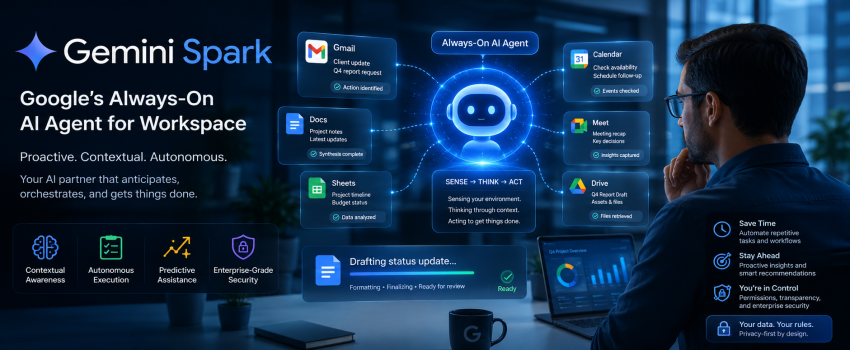
In the rapidly evolving landscape of generative artificial intelligence, Google has shifted its strategy from static chatbot interfaces to dynamic, autonomous assistance. Gemini Spark represents the next frontier in this evolution: an "always-on" AI agent architecture designed to anticipate user needs, manage complex workflows across the Google Workspace ecosystem, and execute multi-step tasks without constant human prompting. As professionals look for ways to reclaim time and reduce cognitive load, understanding how Gemini Spark functions—and how it differs from traditional LLMs, is essential for staying competitive in a digital-first economy.
The Evolution of AI: From Chatbot to Agent
For years, the industry focused on Large Language Models (LLMs) that functioned primarily as "answer engines". You asked a question, the model generated a response, and the interaction concluded. While powerful, this transactional model required a human to stay in the loop for every micro-decision. Gemini Spark marks the industry transition toward "agentic" AI, where the software moves from being a reactive tool to a proactive collaborator.
Moving Beyond Prompting
The shift to agentic systems means that instead of giving the AI a command, you give it an objective. Gemini Spark is designed to hold context over long durations, meaning it remembers your preferences, your current project status, and your communication patterns. It no longer needs to be "woken up" by a blank prompt; it operates as an active layer within your digital environment, monitoring for triggers that require its intervention.
Defining Gemini Spark: Core Functionality
At its heart, Gemini Spark is an intelligent orchestration layer built on top of Google’s multimodal Gemini models. It is designed to act as an "always-on" agent that lives in the background of your productivity suite.
Key Capabilities
• Contextual Awareness: Unlike traditional models that reset after every session, Spark maintains a persistent memory of your active documents, emails, and calendar events.
• Autonomous Task Execution: It doesn't just write a draft; it can draft, format, check for conflicting calendar meetings, and send the final document for review—or even hit "send" if permissions are granted.
• Predictive Assistance: By analyzing patterns in your workflow, Spark can proactively suggest agenda items for meetings or flag potential bottlenecks in project timelines before they become critical.
The Agentic Loop
Gemini Spark operates on a "Sense-Think-Act" loop. It senses changes in your environment (e.g., a new email arrives), thinks about the implications (e.g., this email is a high-priority request regarding the Q4 report), and acts (e.g., drafts a response, pulls the necessary data from Drive, and sets a reminder for you to review it).
How Gemini Spark Integrates with Google Workspace
The true power of Gemini Spark is its deep integration with the Google ecosystem. By leveraging APIs across Gmail, Docs, Sheets, Slides, and Meet, the agent can synthesize information that was previously siloed across different applications.
Cross-App Synthesis
Imagine a scenario where a client emails you requesting a status update on a project. Gemini Spark performs the following:
1. Ingestion: It identifies the email as an action item.
2. Synthesis: It scans your recent Google Docs notes, checks the project timeline in Sheets, and reviews recent Meet transcriptions.
3. Drafting: It generates a coherent status update that reflects the most recent decisions made in meetings and updates made to project files.
4. Formatting: It formats the response according to your preferred professional tone, saving you the time of manual data aggregation.
This level of integration transforms the AI from a writing assistant into a project manager. By keeping the context "always-on," the agent reduces the friction of context-switching between tabs and apps.
The Technical Architecture: Why 'Always-On' Matters
The "always-on" nature of Gemini Spark is supported by a sophisticated architecture that balances performance, latency, and resource management. Google’s infrastructure enables this through a mix of on-device processing and cloud-based reasoning.
The Role of Multimodality
Gemini Spark is built on Google’s native multimodal architecture. This means it doesn't just process text; it can "see" your screen and "hear" your meeting audio. This allows it to understand visual cues in a presentation or the tone of voice in a recorded meeting, providing a much higher level of nuance than text-only agents.
Latency and Efficiency
To ensure the system remains responsive without draining system resources, Google utilizes a tiered processing model. Simple, background tasks are handled by lightweight, low-latency models running locally or via edge computing, while complex reasoning tasks are offloaded to Google’s massive TPU (Tensor Processing Unit) clusters. This ensures that the "always-on" agent does not introduce lag into your daily workflow.
Security, Privacy, and Ethical AI Governance
As with any enterprise-grade AI, security is the primary concern for businesses adopting Gemini Spark. Google has built the agent with a "privacy-first" design philosophy, ensuring that your data is not used to train the base model in a way that would expose your proprietary information to other users.
Enterprise-Grade Protections
• Data Isolation: Your organization’s data stays within your perimeter. The agent learns your patterns but does not leak information to external models.
• Permission-Based Execution: You maintain control over what the agent can and cannot do. If you do not grant the agent permission to send emails on your behalf, it cannot execute that action.
• Transparency Logs: Users and administrators can review a history of what the agent has done, allowing for human oversight and the ability to audit AI-driven decisions.
By emphasizing these safeguards, Google aims to make Gemini Spark a viable tool for highly regulated industries, including finance, healthcare, and legal services.
Best Practices for Professionals Using Gemini Spark
To maximize the ROI of Gemini Spark, professionals must treat it as a junior assistant that needs clear parameters and consistent feedback.
Developing Your AI Workflow
1. Define Boundaries: Clearly set the agent's permissions. Start by allowing it to draft content, and slowly grant "execute" permissions as you build trust in its accuracy.
2. Curate the Context: The more active you are in the Google Workspace environment, the better the agent will perform. Keep your documentation updated, as this serves as the "source of truth" for the agent.
3. Iterative Feedback: When the agent makes a mistake, correct it immediately. Its learning algorithms are designed to prioritize recent corrections, ensuring it doesn't repeat the same error twice.
4. Review, Don’t Just Accept: Always maintain the "Human in the Loop" principle. Use the agent to do 90% of the heavy lifting, but reserve the final 10% for your expert judgment and oversight.
Conclusion
Gemini Spark represents a paradigm shift in how we interact with technology. By moving from a static "ask and answer" relationship to a dynamic "always-on" agentic partnership, Google is enabling a new era of hyper-productivity. For the modern professional, this means less time spent on administrative "busy work" and more time dedicated to high-value strategic thinking. While the technology is sophisticated, its success relies on human oversight, clear workflow definitions, and a commitment to integrating AI into the heart of our daily operations. As Gemini Spark continues to learn and evolve, it will likely become as essential to the modern workplace as email or project management software.
Frequently Asked Questions
1. How is Gemini Spark different from the standard Gemini chatbot?
The standard Gemini chatbot is a reactive tool that waits for your input to perform a specific task. Gemini Spark is an "always-on" agent that operates in the background, maintaining context across your applications, predicting your needs, and executing multi-step workflows without needing a new prompt for every action.
2. Will Gemini Spark automatically send emails or delete files without my permission?
No. Gemini Spark operates within strict permission boundaries set by the user or the organization's IT administrator. You remain in control of which actions the agent can perform autonomously and which actions require your explicit approval before execution.
3. Is my company data used to train the public version of Gemini?
Google explicitly states that for enterprise users, your data is not used to train the public-facing versions of the Gemini models. Your data remains isolated within your organization’s environment to ensure privacy and security.
4. Can Gemini Spark work if I primarily use non-Google applications?
While Gemini Spark is optimized for the Google Workspace ecosystem (Docs, Sheets, Gmail, Meet), it can often ingest data from third-party tools via integrations and APIs. However, its deepest "always-on" capabilities are currently restricted to Google's suite of products.
5. Is there a cost associated with the "always-on" agent features?
Gemini Spark is typically offered as part of Google Workspace’s premium AI tiers. Because it requires significant computational power to maintain an "always-on" state and perform continuous background reasoning, it is generally bundled with enterprise or advanced productivity subscriptions.

Nexevo Technologies is a Professional web designing and web development company bangalore, which is offers a full facility for designing a website at a reasonable price. We are award-winning web design and digital marketing company working since 2012.
Share with





 Call
Call Whatsapp