Navigating eClinicalWorks FHIR & HL7 Integration: Lessons Learned and What We Can Build for You



Introduction: When a Real Project Becomes a Roadmap
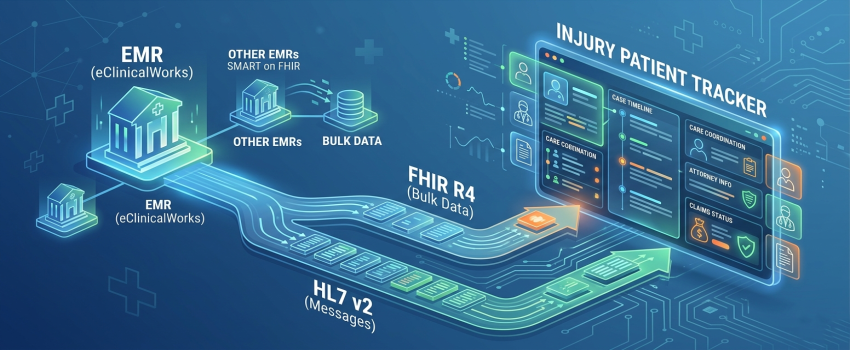
Not long ago, the engineering team at Nexevo took on a deceptively ambitious project: build an Injury Patient Tracker for a healthcare client operating on eClinicalWorks (eCW). The goal was clear — pull patient data directly from the client's EMR and surface it inside a purpose-built tracker that would help their clinical and administrative teams monitor injury patients, manage case timelines, and coordinate across care providers, insurance carriers, and attorneys.
What followed was one of the most instructive integration journeys our team has undertaken — not because the destination was unreachable, but because reaching it required a precise, earned understanding of how eClinicalWorks structures its API ecosystem, how FHIR and HL7 behave differently under production conditions, and exactly where one standard's capabilities end and the other's begin.
We are publishing this account for a specific reason: every lesson we learned is now a capability we can bring to your project. If your organization is building on eCW — or any FHIR and HL7-based EMR environment — this is the guide we wish we had at the start.
Understanding the eClinicalWorks API Landscape
eClinicalWorks is one of the largest ambulatory EMR platforms in the United States, serving tens of thousands of providers. Like most modern EMRs, it exposes patient data through a FHIR R4 API — but eCW also supports HL7 v2 messaging for operational and financial workflows that FHIR does not fully cover. Understanding both is essential.
Before writing a single line of integration code, your team must understand the two distinct data access modes eCW offers external vendors:
Single Patient Access (SMART on FHIR)
Allows your application to retrieve data for one patient at a time, typically triggered by a patient login or authorization event. Designed for patient-facing apps and point-of-care tools. Requires a different app registration type and authorization flow.
Bulk Patient Data Access (FHIR Bulk Data Export / $export)
Allows your application to request data across an entire patient population or defined cohort in a single asynchronous operation. Designed for analytics platforms, care coordination tools, reporting engines, and population health dashboards. This is the correct mode for most B2B clinical application use cases.
This distinction is not cosmetic. It determines which app type you register in the eCW vendor portal, which OAuth 2.0 scopes you request, what your authorization flow looks like, and what class of data you receive. Getting it wrong at registration creates downstream delays that cost real sprint time. We know because we experienced it.
Step 1: Registering Your App in the eCW Vendor Portal
Access to eClinicalWorks' FHIR APIs requires registering your application in the eCW App Orchard — eCW's dedicated developer and vendor portal. This is your integration passport. No registration means no API access, and the registration type you choose has long-lasting consequences.
The end-to-end registration process:
- Create a developer or vendor account in the eCW App Orchard if you do not already have one.
- Begin the application registration workflow. You will be prompted to define your application's purpose, the type of data access required, and your specific clinical use case.
- At this point you must choose your app type: single patient app or bulk patient data app. This is the most consequential decision in the entire registration process. For population-level access – analytics, care management, reporting, tracking – always choose Bulk Patient Data.
- If you are unsure which type applies, confirm your use case with the eCW integration team before submitting. Registering under the wrong type means re-registering, which costs approval time.
- eCW reviews and approves your application. This is not instantaneous — build a review window of several business days into your project timeline.
- Upon approval, you receive your client credentials: Client ID, Client Secret, and your tenant-specific FHIR base URL. These are your integration keys.
Nexevo Lesson: App Type Is Not Obvious From the Portal UI
When our team registered our application, the portal's category descriptions did not make the bulk vs. single patient distinction as clear as it needed to be for our specific use case. We initially registered under the wrong type and were later asked to re-register under Bulk Patient Data. That shift required revisiting the approval workflow and delayed our integration timeline. Our advice: map your use case explicitly to the bulk data category before you begin registration, and when in doubt, ask eCW's technical support team to confirm before you submit.
Step 2: Connecting Your App to the Client's Live eCW Environment
Vendor portal approval is only the first gate. Your registered application exists as an abstract entity in eCW's ecosystem until it is explicitly connected to a specific client's eCW instance. This client-side authorization step is where many external development teams get stuck — and where project management experience matters as much as technical skill.
What happens after vendor portal approval:
- Your client must authorize your registered app within their own eCW administration portal. Their eCW system administrator logs into the admin panel, navigates to the application management section, and explicitly approves your app for their environment.
- Once approved on the client side, a connection is established between your app credentials and their tenant-specific FHIR endpoint. The FHIR base URL now points to their eCW instance, not a generic sandbox or shared environment.
- For bulk data access, you then work with the client's eCW admin — and potentially eCW support — to define and configure Patient Groups within the eCW system. In the FHIR bulk data model, exports operate on Groups: you export a defined cohort, not an unbounded full-population dump.
- Groups are configured through the eCW administrative interface and can be defined by care team, department, diagnosis code, visit type, payer, or custom clinical criteria. Each Group has a FHIR resource ID that your application references in bulk export API calls.
- With groups in place, your application invokes the FHIR $export operation against the Group endpoint, initiating an asynchronous bulk data job. eCW processes the request and makes the results available as NDJSON files at a secure polling endpoint.
- Your application polls the job status URL at intervals until the export completes, then downloads and processes the NDJSON payloads — organized by FHIR resource type: Patient, Condition, Observation, Encounter, MedicationRequest, and others available within your authorized scope.
Project Management Note
Client-side eCW authorization is often underestimated in integration project plans. It requires coordination between your team, your client's internal eCW admin, and sometimes eCW support directly. Patient group definition requires clinical input — someone needs to determine which patients belong in which group. Factor all of this into your sprint planning. A conservative estimate adds 3 to 10 business days to your integration timeline for this phase alone.
The FHIR Reality: What eCW Exposes and What It Does Not
Here is the single most important structural insight from our integration project — and the reason this blog exists: FHIR compliance does not mean complete data access.
eClinicalWorks implements FHIR R4 legitimately and substantively. It passes standard compliance tests and satisfies ONC certification requirements. But every EMR vendor's FHIR implementation has a scope. Not every data element your clinical use case requires is available through FHIR endpoints. The delta between the FHIR specification and what eCW actually exposes through its API is where most real-world integration plans encounter their first hard wall.
In our injury patient tracking project, this delta became critical. Injury case management sits at the intersection of clinical care, legal proceedings, and insurance adjudication. A robust injury tracker needs to know not just the patient's diagnosis — but who their attorney is, which insurer is covering the claim, what the claim status is, and whether this visit was a workplace injury, an auto accident, or another injury category that triggers a different billing pathway. Here is exactly what we found:
| Data Domain | Available via eCW FHIR | Solution Approach |
|---|---|---|
| Insurance Information | Limited / Partial | HL7 ADT & DFT Messages |
| Claims & Billing Data | Not Exposed via FHIR | HL7 DFT / Financial Msgs |
| Attorney & Legal Info | Not Exposed via FHIR | Custom HL7 + Manual Intake |
| Injury-Specific Visit Types | Not Exposed via FHIR | HL7 ADT with Z-Segments |
| Encounter Clinical Notes | Available (FHIR R4) | FHIR Bulk Export |
| Patient Demographics | Available (FHIR R4) | FHIR Bulk Export |
| Diagnoses & Conditions | Available (FHIR R4) | FHIR Bulk Export |
| Medications & Prescriptions | Available (FHIR R4) | FHIR Bulk Export |
Why Insurance, Claims, and Attorney Data Live Outside FHIR
These data domains — insurance coverage details, claims and billing transactions, legal representation, and visit type classifications for injury workflows — are operationally driven rather than clinically driven. They live in the administrative and financial layers of eCW, which are served by HL7 v2 messaging (ADT, DFT message types) rather than FHIR resources. FHIR R4, even when fully implemented, was designed primarily around clinical data exchange. The operational and financial envelope around a patient's care — especially in complex injury case workflows — requires HL7 to complete the picture.
Bringing In HL7: The Architecture That Completed the Picture
When FHIR's implementation scope could not surface the full dataset our injury tracking product required, we turned to HL7 — the older, deeply embedded messaging standard that still powers the operational backbone of most clinical environments, including eClinicalWorks.
This was not a fallback or a workaround. It was the architecturally correct decision. Understanding why requires understanding what HL7 is, how it differs from FHIR, and what it unlocks in the eCW environment specifically.
What is HL7?
Health Level Seven International (HL7) is the global standards organization responsible for both HL7 v2 messaging and FHIR. HL7 v2 — the older version — has been in production across hospitals and clinics since the 1980s and remains the most widely deployed healthcare data exchange standard in the world by active implementation volume.
HL7 v2 operates through message-based communication. Clinical and administrative events — a patient admission, a discharge, a charge posting, a lab result, an appointment change — trigger HL7 messages that are transmitted between systems in near real-time. These messages are structured text payloads with defined segment types, each carrying a specific slice of clinical or administrative data.
Key HL7 v2 message types and their role in injury workflows:
ADT (Admit, Discharge, Transfer) — Carries patient registration, admission details, and demographic information. Critically, ADT messages include visit type classification, insurance details via IN1 and IN2 segments, and location data. For injury workflows, ADT was our primary source for identifying injury-specific visit categories that FHIR did not surface.
- DFT (Detail Financial Transaction) — Carries billing and financial data, including charge codes, service lines, payer information, and transaction references. DFT messages gave us access to claims and insurance carrier data that the FHIR API did not expose.
- ORM / ORU (Order and Result Messages) — Carry clinical order and observation result data, often with more granular workflow detail than the equivalent FHIR Observation or ServiceRequest resources.
- SIU (Scheduling Information Unsolicited) — Appointment and scheduling event messages. Useful for tracking the sequence of injury follow-up visits and care plan progression.
- Z-Segments (Custom Extensions) — HL7 v2 allows implementations to append custom Z-segments to standard messages. eClinicalWorks uses Z-segments to carry proprietary fields — including certain attorney and legal case reference data — that have no equivalent field in the standard FHIR resource model. Parsing Z-segments requires implementation-specific knowledge of how eCW structures them.
How HL7 Connects to eClinicalWorks
eClinicalWorks supports HL7 v2 message interfaces alongside its FHIR API. These operate through HL7 interface engines — middleware components that receive HL7 messages generated by eCW in response to clinical and administrative events. In a typical setup:
- eCW generates HL7 v2 messages triggered by clinical events — patient admissions, visit completions, charge postings, appointment changes.
- Your integration infrastructure receives and parses these messages through an HL7 listener or interface engine.
- Your system extracts relevant segments — patient demographics from PID, insurance from IN1/IN2, financial transactions from FT1, visit type and attending provider from PV1, legal case data from custom Z-segments.
- This operational data enriches what you have already pulled from the FHIR bulk export, creating a composite patient record that spans both the clinical and administrative dimensions of each case.
The Hybrid Architecture Decision
For our injury patient tracker, we designed a hybrid data ingestion model: FHIR Bulk Export ($export) provided the clinical foundation — diagnoses, medications, encounters, and patient demographics — while HL7 v2 message streaming provided the operational layer that FHIR missed: insurance carrier identification, claim transaction references, attorney associations, and injury visit type classifications. Together, these two channels produced a complete and actionable view of each patient's injury case. This hybrid approach is not an edge case — it is the correct architecture for any complex clinical product built on eCW.
HL7 v2 vs. FHIR R4: Knowing When to Use Which
| Dimension | HL7 v2 | FHIR R4 |
|---|---|---|
| Data Model | Segment-based flat text (pipe-delimited) | JSON/XML resource objects |
| Real-time Events | Excellent — event-driven by design | Limited — polling-based |
| Financial/Insurance | Strong — DFT, IN1/IN2 segments | Limited in most EMR implementations |
| Legal/Custom Fields | Supported via Z-segment extensions | Not available in standard FHIR |
| Clinical Records | Rich clinical segment support | Strong — standardized resources |
| Interoperability | Vendor-specific, widely deployed | Modern open standard |
| Best Used For | Operational events, billing, and financials | Population analytics, patient apps |
The right question is never 'which standard is better?' — it is 'which standard serves this specific data need?' For population-level clinical data retrieval, FHIR wins. For real-time operational events, financial transactions, and administrative data that EMR vendors have not yet mapped into their FHIR implementations, HL7 v2 remains the practical answer.
Key Lessons from Our eCW Integration Journey
Every insight below represents real project hours spent navigating eCW's ecosystem. We are sharing them so your team can learn faster.
1. App type registration is a foundational decision — get it right before you register.
The choice between the Single Patient App and the Bulk Patient Data App in the eCW vendor portal is not a cosmetic one. It shapes every subsequent step: credentials, scopes, authorization flow, and data access pattern. Map your use case to the correct type before you submit. If you are building anything that touches more than one patient at a time, the answer is Bulk.
2. Client-side eCW configuration is mandatory and often underestimated.
Vendor portal approval does not activate your integration. Your client must authorize your app within their eCW environment. Their eCW administrator must configure the connection. Patient groups must be defined with clinical input. These steps require coordination across multiple stakeholders and should have dedicated line items in your project plan.
3. FHIR data has real implementation-scope limits in eCW.
Map your required data fields against eCW's actual live FHIR surface area before committing to a product design. Insurance data, claims data, attorney references, and injury-specific visit classifications are not available through FHIR in eCW's implementation. If your product needs this data, you need HL7.
4. HL7 v2 is not a legacy workaround — it is a production-grade complementary channel.
HL7 v2 messaging remains the most widely deployed healthcare data standard in the world for good reasons. In the eCW environment specifically, it is the primary channel for financial, insurance, and event-driven clinical data. Treating it as a fallback misses the point: it is part of a complete integration architecture.
5. A hybrid FHIR + HL7 model is often the architecturally correct answer.
For complex clinical products — especially those involving injury case management, insurance coordination, or legal workflows — a single-channel approach will not surface the full data picture. FHIR handles the clinical layer. HL7 handles the operational layer. Together, they provide complete coverage.
6. Async bulk export requires purpose-built engineering.
FHIR $export is asynchronous. Your application needs robust job dispatch, status polling, retry logic, NDJSON parsing, data normalization, and error handling. It is not a request-response pattern. Design your pipeline architecture before you start building, not after.
7. Build timeline buffers for vendor and client-side processes.
eCW app approval, client-side authorization, and group configuration are not instant. A realistic integration timeline includes these human-coordinated steps. Projects that do not account for them consistently slip.
What Nexevo Brings to Your Project
The integration capability described in this post was built on a live production engagement, under real client constraints and delivery expectations. It is not theoretical knowledge. It is a repeatable practice we now bring to every healthcare integration project we take on.
eCW Vendor Portal Navigation
We guide you through registering the right app type, configuring correct FHIR scopes, and completing the eCW approval process without costly restarts or re-registrations.
FHIR Bulk Data Architecture
We design and build the full async export pipeline — $export job dispatch, status polling, NDJSON parsing, data normalization, and integration with your product layer.
HL7 v2 Interface Development
We build HL7 listeners, parsers, and integration pipelines for ADT, DFT, ORM, ORU, and SIU message types — including Z-segment parsing for eCW-proprietary fields.
Hybrid FHIR + HL7 Data Modeling
We architect composite data models that combine FHIR bulk export with HL7 v2 message streams, giving your product a complete clinical and operational data layer.
Insurance & Claims Data Integration
We extract insurance carrier data, claims references, and billing transactions through HL7 DFT and IN1/IN2 segments when FHIR's scope falls short.
Client-Side eCW Setup Coordination
We manage or guide the client-side authorization process — from eCW admin app approval through patient group configuration — so you are not blocked waiting on stakeholders.
FHIR Data Gap Analysis
We map your required clinical data fields against eCW's live FHIR surface area and help you design around gaps before they become product blockers.
End-to-End Clinical Product Development
From data layer through application UI — we build complete clinical tools on top of eCW: injury trackers, care dashboards, reporting platforms, and more.
Is This the Right Service for Your Organization?
If any of the following situations sounds familiar, we would like to talk with you:
- You are building a custom application or product on top of an eClinicalWorks EMR environment and need a technical partner who has already delivered a production integration on this platform.
- You need to pull patient data from eCW into an external system — for analytics, reporting, care coordination, or a purpose-built clinical tool.
- Your development team is blocked in the eCW Vendor Portal, waiting on approvals, or uncertain which app registration type is right for your use case.
- You have hit the boundaries of eCW's FHIR response and are not sure what data is accessible, through which channel, and with what configuration.
- Your product needs insurance coverage details, claims data, attorney or legal case associations, or injury-specific visit type classifications — data that requires HL7 in the eCW environment.
- You need to build a population health tool, analytics platform, injury management product, or care coordination system on bulk FHIR or HL7 data.
- You are planning an eCW integration project and want to avoid the timeline delays and re-work that come from discovering these complexities mid-sprint.
Our Practice Focus
Nexevo works at the intersection of healthcare data engineering, FHIR and HL7 integration architecture, and clinical application development. We do not just understand the standards — we understand the operational processes, vendor dynamics, client coordination requirements, and clinical context that determine whether a healthcare integration project ships on time and delivers what it promises.
The Future of Healthcare Interoperability — And Why It Matters Now
The regulatory push for interoperability — the 21st Century Cures Act, the ONC Interoperability and Information Blocking Final Rule, and the CMS Patient Access Rule — has made FHIR-based integration a compliance obligation, not just a technical aspiration. Healthcare organizations that cannot provide FHIR-based access to their data face audit risk and operational disadvantage.
At the same time, HL7 v2 is not disappearing. The installed base of HL7 v2 interfaces across US hospitals and clinics is enormous, and EMR vendors including eClinicalWorks continue to generate HL7 messages for the operational event streams that FHIR's pull-based model does not naturally replace. Organizations building on eCW today need both.
Nexevo built that competency on a live client project. We would be glad to bring it to you.
Ready to Build on eCW FHIR and HL7 Data?
Whether you are at the planning stage, stuck mid-integration, or trying to understand what data is actually accessible through eClinicalWorks, Nexevo, as a software development in Bangalore, can step in with the context and capability to move your project forward.

Nexevo Technologies is a Professional web designing and web development company bangalore, which is offers a full facility for designing a website at a reasonable price. We are award-winning web design and digital marketing company working since 2012.
Share with






 Call
Call Whatsapp